


RC Setup App & Race Log
4.761.00 Reviews
App Specs
- Version
- 1.6.1
- Updated On
- License
- Free
- Downloads
- 10,000+
- Developer
- So Dialed Racetech
- Categories
- Auto & Vehicles
- Platform
- Android
Screenshots
 Analysis by AppCompare
For RC racers, setup notes are useful only when they help explain what happened on the track. I like that RC Setup App & Race Log is built around keeping those details together, rather than asking me to rely on memory or loose scraps of paper. Its focus is practical: record a car’s settings, connect them with a race, and make it easier to look back before the next run. That makes it more appealing as a steady trackside notebook than as a magic shortcut to faster lap times.
That distinction matters. An app can help me notice patterns, but I still have to enter accurate details and make sensible changes. If I treat each setup as a record of what I actually ran, I can compare sessions more thoughtfully; if I enter vague notes after the fact, the record will be far less useful. The app’s value therefore depends less on complicated analysis and more on whether I build a repeatable habit around it.
It is a free auto and vehicle app from So Dialed Racetech, with a 4.7 average from around 290 ratings and over 10,000 installs. It is rated for Everyone, and its current version is 1.6.1. I would still plan around the in-app purchases, which range from $4.99 to $49.99 per item: the basic download costs nothing, but anyone deciding whether to pay should check what is included in the app at the time they use it. That is a more useful expectation than assuming every tool or report is automatically part of the free experience.
Keeping Setup Notes Useful at the Track
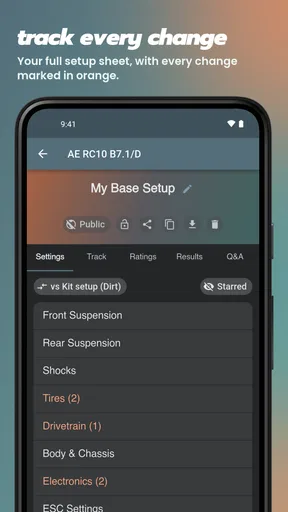
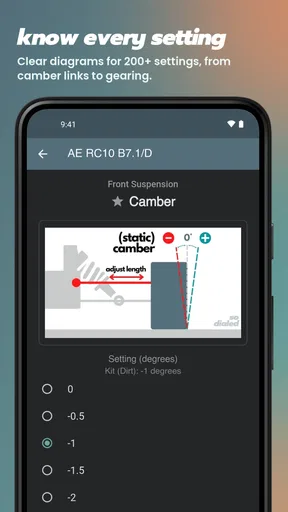
The strongest case for the app is simple: it gives RC racers one place to preserve the details that can otherwise get lost between practice days. You can record settings such as suspension choices, tires, and motor adjustments, then keep race notes alongside them. That connection is more valuable than a bare list of settings. A setup only makes sense in context: which car it belonged to, what the track was like, and how the run went.
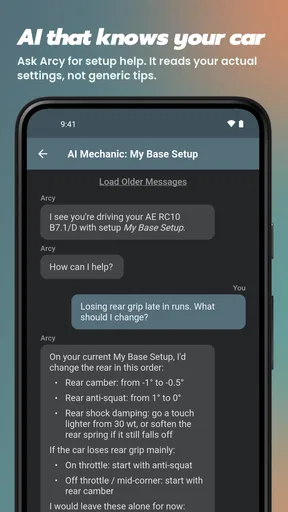
For example, if the car feels unsettled after a change, a record of the previous configuration gives me a reference point instead of leaving me to guess what I altered. I would make one adjustment at a time when practical and write down the result soon after the run. That routine will not guarantee a better setup, but it makes cause and effect easier to reason about. The app works best as a disciplined setup log, not as an automatic tuning assistant.
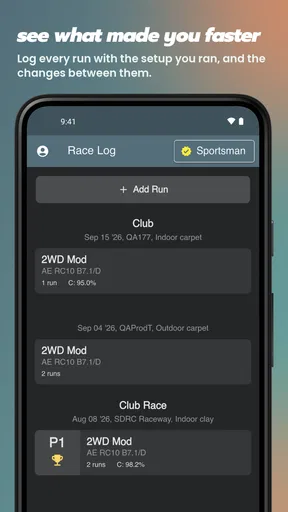
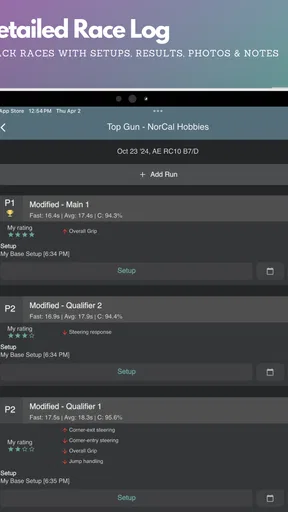
Race entries can also preserve results, weather conditions, and track details. Those notes are easy to dismiss when a session is fresh in my mind, yet they become useful when I return to the same venue in different conditions. A quick note such as “rear felt loose after the surface changed” is more meaningful later when paired with the settings used that day. The practical tip is to record observations in plain language, not just numbers: the reason for a change can be as important as the setting itself.
Features that Stand Out
Let’s dive into some of the features that make this app a must-have for RC enthusiasts:
Worth Reading Before You Choose

Baby Panda World Brings Quick Play to Modern Phones, but Its Game Library Feels Busy

ESPN’s Live Game View Makes Following Close Games Easier

QuizzLand Review: A Good Fit for Short Trivia Breaks, Not Every Player

Basketball Stars: Multiplayer Is Fast, but Can It Recover When Matches Go Wrong?

WEBTOON Turns Phone Updates Into a Better Reading Routine

Link to Windows Runs on Shared Habits, Not Social Feeds
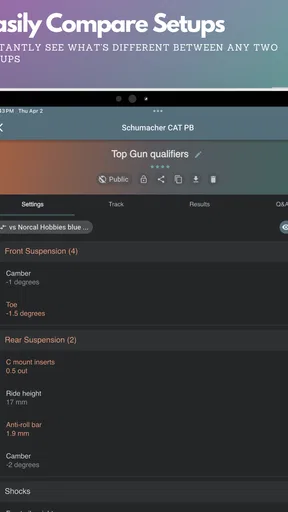
- Comprehensive Setup Logs: You can log every little detail about your RC car’s setup. Whether it’s the suspension settings, tire choices, or motor tweaks, this app lets you store it all. No more fumbling through scribbled notes or trying to remember last week’s setup.
- Race Logs: After each race, you can log the results, weather conditions, and track details. This feature is pure gold for analyzing performance and improving your game.
- Customizable Reports: The app lets you generate reports that are tailored to your needs. These reports are perfect for reviewing your performance over time and identifying areas for improvement.
- User-Friendly Interface: Navigation is a breeze, with well-organized menus and easy-to-access settings. Even if you’re not tech-savvy, you’ll find this app straightforward and simple to use.
Reports are most useful when I have enough consistent entries to compare. A handful of scattered logs can produce a misleading impression, especially if I changed several things at once or raced on very different surfaces. I would use reports to prompt questions—what changed between two good runs, or when did a familiar problem begin?—rather than treat them as proof that one component choice caused a result. That distinction keeps the record helpful instead of turning it into false certainty.
The Real-World Experience
So, what’s it like using this app in a real-world scenario? Picture this: You’re at the track, adrenaline pumping, and you need to quickly adjust your car’s setup based on the current conditions. With the app, all your previous setups are at your fingertips, allowing you to make informed decisions fast.
During my test runs, the app was incredibly responsive. I could easily flip through past races and setups, making it seamless to adapt my strategy on the fly. Plus, the ability to log new data right there at the track meant I didn’t miss any critical details.
A realistic routine would be to check the last setup before practice, note the track conditions, and make a brief entry after each run while the feel of the car is still fresh. If the track changes during the day, I would log that separately rather than quietly overwrite the earlier record. That small choice preserves a useful comparison: it lets me distinguish a setup change from a surface change when reviewing the day later. A phone is convenient in the pits, but I would keep entries short enough that recording them does not interrupt preparation or make me miss time on the track.
There is a trade-off here: detailed records take attention. If I try to document every adjustment while rushing between heats, logging can feel like another chore. My approach would be to capture only the settings I changed and the most relevant observation immediately, then fill in less urgent context after the run. For racers who enjoy testing methodically, this is a worthwhile habit. For someone who wants to make quick changes by feel and has no interest in reviewing them later, a simple note on paper may be less friction.
Where It Fits—and Where It Doesn’t
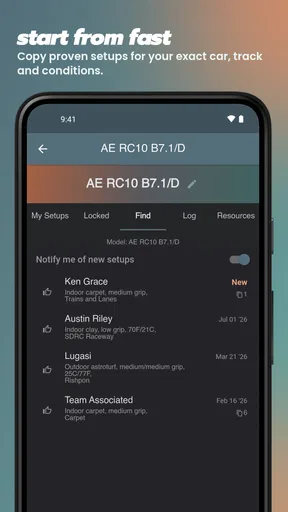
This is best suited to people who run the same RC car often enough for comparison to matter: club racers, regular practice-day drivers, and hobbyists who like experimenting with suspension, tires, or motor choices. It can also help someone who shares setup knowledge with a friend, provided both people are careful to label which car and session each note refers to. The more consistent the entries, the easier it is to return to a known baseline after a change fails.
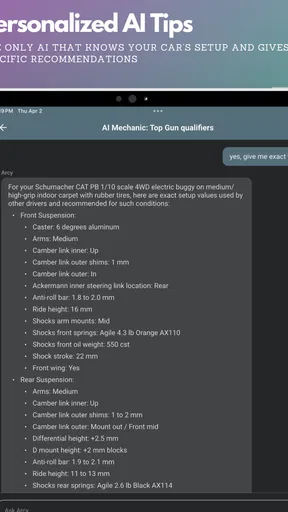
It is less compelling for a casual owner who takes the car out occasionally, rarely changes settings, and has no desire to review past runs. It also should not replace direct observation, advice from an experienced racer, or a model-specific setup guide when you need to learn what a particular adjustment does. The app can keep your own records organized; it cannot tell you whether a setup is mechanically appropriate or diagnose a problem from a result alone.
Compared with the usual alternatives—paper notebooks, phone notes, or scattered photos—the app’s advantage is the intention to keep setup and race information together and make it reviewable. A notebook can be faster to scribble in, and photos can capture a setting or part without typing, but both depend on a filing system that is easy to maintain. I would not abandon either if it suits a particular job: a quick photo can complement a written entry, while this app is the better home for records I want to compare over time.
One practical question is whether a racer needs to buy anything to start. The app is free to download, while in-app purchases are offered; I would begin with the free version and decide only after checking which features I actually use. Another is whether it suits every RC discipline. Its general setup-and-race-log purpose is relevant to racers who want to record their own configurations, but anyone looking for a specialized tool for a particular vehicle or a source of ready-made tuning advice should make sure that matches their needs before relying on it.
The app is listed for Android devices running version 7.0 or later. That makes the minimum requirement worth checking before installing on an older phone. At the track, I would also make sure the device is charged and that I can reach my existing notes quickly; a record-keeping tool only helps when it is available at the moment I need to refer to it.
Final Thoughts
Overall, the RC Setup App & Race Log is an invaluable tool for anyone serious about RC racing. It takes the hassle out of managing your car setups and race logs, enabling you to focus on what truly matters – racing! Whether you’re a weekend warrior or a seasoned pro, integrating this app into your routine can significantly enhance your racing experience.
If you’re looking to up your RC game, give this app a shot. It’s not just about keeping records; it’s about enhancing your performance and taking your racing skills to the next level.
My recommendation is strongest for racers who are willing to make brief, consistent entries and want to learn from previous sessions. Start with a baseline setup, record changes one at a time when possible, and add a short note about how the car behaved. That turns the log into something you can act on rather than an archive of disconnected details. If you only race now and then or prefer not to keep records, the app may feel like unnecessary admin; if you are trying to understand why a setup works at one track and not another, it offers a practical place to build that knowledge.
Pros
- Intuitive interface for easy navigation.
- Comprehensive setup options for RC cars.
- Detailed race log tracking capabilities.
- Customizable settings for personal preferences.
- Supports multiple RC car models.
Cons
- Limited offline functionality available.
- Occasional sync issues with cloud.
- Requires frequent updates for stability.
- In-app purchases can be pricey.
- Interface may be overwhelming for beginners.
FAQs for RC Setup App & Race Log
What is the primary function of the RC Setup App & Race Log?
The RC Setup App & Race Log is designed to help RC enthusiasts optimize their vehicle settings and track race performance efficiently. It provides tools for recording setups, monitoring changes, and analyzing performance data, making it easier to fine-tune your vehicle for better results on the track.
Is the RC Setup App & Race Log compatible with all RC vehicle types?
Yes, the app is compatible with a wide range of RC vehicle types, including cars, trucks, and buggies. It offers customizable settings for various models, allowing users to input specific parameters for different vehicles and track their performance individually.
Does the app offer any community or sharing features?
Indeed, the app includes features that allow users to share their setups and race logs with the community. This sharing capability enables users to exchange tips, compare results, and collaborate with other RC enthusiasts to improve their performance and knowledge.
Can I use the RC Setup App & Race Log offline?
Yes, the app offers offline functionality, allowing you to record setups and race data without an internet connection. This is particularly useful during races or in locations with limited connectivity. Once online, you can sync your data for backup and sharing purposes.
What platforms is the RC Setup App & Race Log available on?
The RC Setup App & Race Log is available on both Android and iOS platforms. It can be downloaded from the Google Play Store for Android devices and the Apple App Store for iOS devices, ensuring accessibility to a wide range of users.


